




- Published on: 2026-08-02 07:00:22
TradingPRO Account Login: Your Secure Gateway to Global Markets in 2026

The market moves at the speed of light. A single minute of downtime can be the difference between a legendary trade and a missed opportunity. You're ready to dominate the charts, but a sudden timeout or a forgotten credential stands in your way. Securing your tradingpro account login shouldn't feel like a battle against the machine. It's the ignition switch for your entire strategy. Whether you're scaling a Scalp Account or managing a Micro portfolio, your entry into the Trade Hub must be instant and impenetrable.
We understand that high volatility demands high performance. Nothing is more frustrating than technical friction when the stakes are high. You deserve a frictionless gateway that keeps you ahead of the curve. This guide delivers the definitive roadmap to mastering your access points, troubleshooting 2FA sync issues, and clarifying the divide between your Client Portal and platform credentials. We'll show you how to maintain total command over your dashboard so you can focus on what actually matters: winning.
Key Takeaways
- Master the tradingpro account login process with a streamlined guide to accessing the secure Client Portal and high-performance Trade Hub.
- Eliminate technical friction by learning to instantly resolve authentication errors and synchronize your 2FA for uninterrupted market entry.
- Navigate your dashboard with precision, moving between real-time market insights and the elite Social Trading ecosystem.
- Secure your edge on the move by syncing your MT4 and MT5 credentials across desktop and mobile platforms effortlessly.
- Optimize your trading environment post-login by auditing leverage settings and ensuring Negative Balance Protection is active for your account type.
Accessing the TradingPRO Client Portal: A Step-by-Step Guide
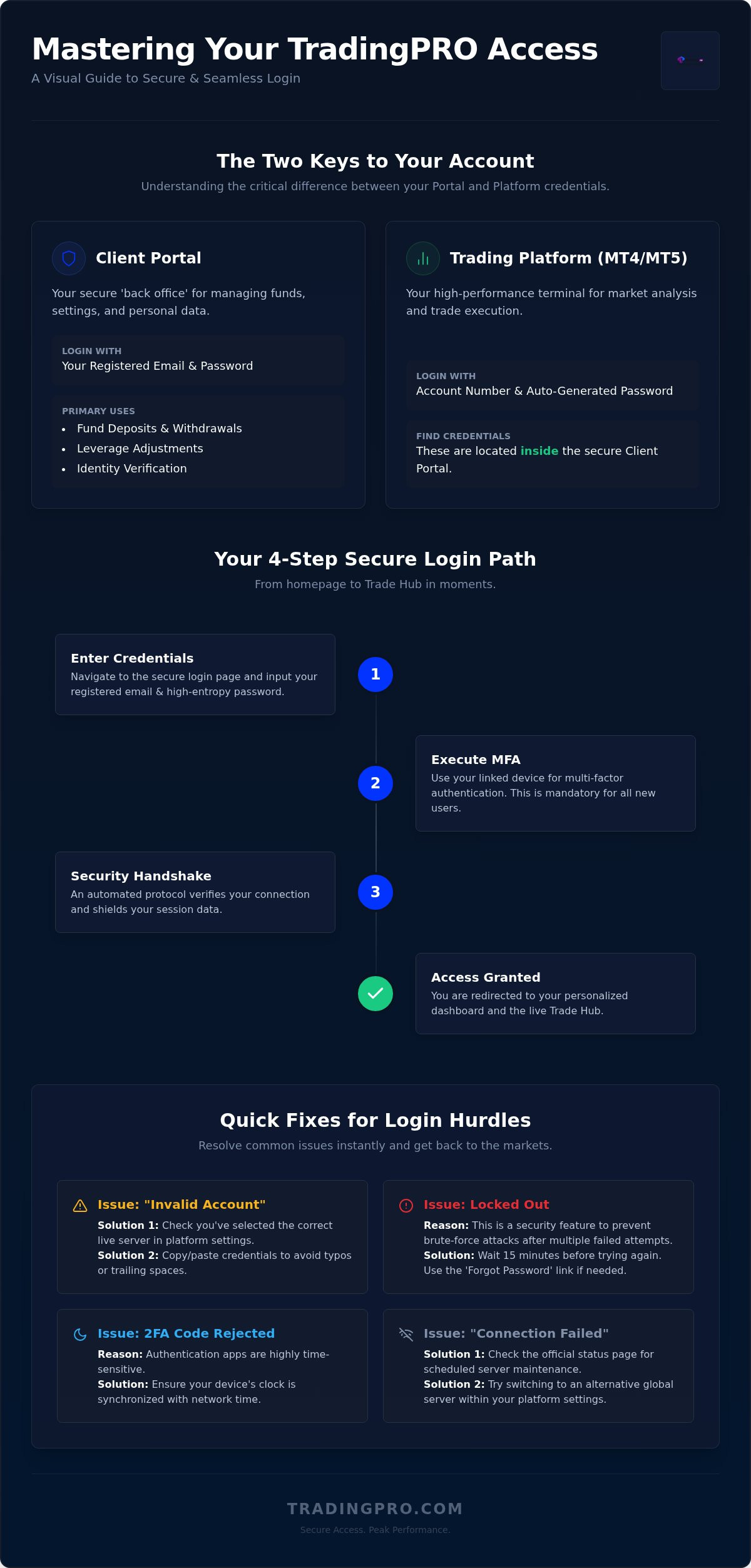
Your journey into elite financial markets begins with a single, secure entry point. The tradingpro account login is more than just a form; it's the bridge to institutional-grade execution and real-time capital management. To begin, navigate directly to the TradingPRO secure login page. This encrypted environment ensures your data remains shielded from external threats while providing the speed you need to catch market openings.
Follow these precise steps for instant access:
- Input your registered email address and high-entropy password.
- Execute the multi-factor authentication (MFA) protocol via your linked device.
- Wait for the automated security handshake to complete.
- Redirect instantly to your personalized dashboard or the Trade Hub for live market action.
Client Portal vs. Trading Platform Credentials
Many traders stumble by confusing their 'Back Office' credentials with their platform login. Your Client Portal login manages your funds, leverage settings, and sensitive personal data. In contrast, your electronic trading platform credentials (MT4 or MT5) are used strictly for order execution. You don't use your portal password to log into MT5. Instead, you'll find your specific platform account numbers and auto-generated passwords inside the secure portal area. This separation creates an essential security layer. It ensures that even if platform access is compromised, your core capital remains locked behind portal-level encryption.
First-Time Login: Setting Up Your Secure Environment
In 2026, security is the ultimate priority. New users must complete mandatory 2FA setup during their initial tradingpro account login session. This process involves syncing a biometric or app-based authenticator to your profile to prevent unauthorized access. Once inside, you can link your specific account types, such as the Rookie Account for beginners or the Scalp Account for high-frequency strategies. Don't forget to complete your identity verification immediately. Our streamlined system often processes these checks in 15 to 20 minutes; unlocking the ability to process swift withdrawals in under 24 hours. This proactive step ensures your trading environment is fully optimized and compliant from day one.
Troubleshooting Common TradingPRO Login Issues
Precision execution requires a flawless start. When your tradingpro account login hits a snag, it's usually a minor technical misalignment rather than a system failure. The 'Invalid Account' error is the most frequent hurdle. It often stems from selecting the wrong server in your platform settings. Double check that you've chosen the live server assigned to your specific account type. Even a single trailing space in your password field will trigger a rejection. Copy and paste your credentials carefully to ensure total accuracy.
Security protocols are non-negotiable. If you're locked out after multiple failed attempts, don't panic. This temporary freeze is a vital part of investor protection, designed to thwart brute-force attacks. Wait 15 minutes before trying again. For a frictionless experience, keep your browser cache clean. Old session data can conflict with the portal's high-performance architecture. If 2FA codes are rejected, synchronize your device's clock. Authentication apps rely on perfect time alignment to validate your entry.
Forgotten Passwords and Recovery Procedures
Memory shouldn't be your only defense. We recommend the one-sentence rule for passwords: create a long phrase that's easy to remember but impossible for bots to guess. If you do lose your way, the recovery flow is swift. Click the 'Forgot Password' link on the tradingpro account login page. You'll receive a secure reset link via your registered email immediately. If your primary email is inaccessible, contact our 24/7 multilingual support team. They'll guide you through a manual verification process to restore your access without compromising security.
Server Connectivity and Maintenance Alerts
Markets never sleep, but servers occasionally need a tune-up. Routine maintenance typically occurs during low-liquidity weekend windows. If you encounter a 'Connection Failed' status, check our official status page for scheduled downtime. This is different from an 'Incorrect Login' message, which always points to credential errors. You can often bypass local latency by switching to an alternative global server within your platform settings. Maintaining this flexibility ensures you're always ready when the opening bell rings. If you're still facing hurdles, re-access the secure portal to confirm your platform account status.
Navigating the Dashboard: From Trade Hub to Social Trading
Successful execution depends on the speed of your intelligence. Once you've completed your tradingpro account login, you gain immediate entry to a unified command center designed for peak performance. The Trade Hub serves as your primary tactical interface. It delivers real-time market insights and technical analysis directly to your screen; this ensures you never trade in the dark. This isn't just a static portal. It's a dynamic environment where you can monitor your equity growth, manage deposits, and activate the latest deposit bonus promotions with a single click.
Your dashboard acts as a safe-haven for high-stakes capital management. Adhering to SEC guidelines on account security, we've engineered the interface to provide total transparency over your risk profile. You can audit your Negative Balance Protection status or adjust your leverage settings without leaving the main window. Our system supports leverage up to 1:2000 across all account tiers, providing the power you need to maximize market opportunities. This centralized control minimizes the time spent on administration and maximizes the time spent on active market engagement.
Managing Your Multi-Tiered Accounts
Diversity is the cornerstone of institutional-grade strategy. The TradingPRO dashboard allows you to toggle between Micro, Pro, and Scalp accounts seamlessly. If you're testing a new approach in the Rookie Account, you can view its performance metrics alongside your high-frequency ScalpX configurations. Internal transfer mechanics are built for speed. You can move funds between your different account numbers in seconds. This allows you to reallocate capital to the most profitable opportunities as they arise.
Social Trading Integration
Empowerment comes from leveraging collective expertise. The Social Trading ecosystem is integrated directly into your post-login experience. The 'Search and Copy' interface enables you to filter top-tier traders by performance, drawdown, and strategy type. Once you find a match, you can set precise risk parameters to automate portfolio replication. This ensures you maintain control over your exposure even when following elite strategies. Review your social feed regularly to gauge community sentiment and stay ahead of rapid price shifts that characterize the 2026 market landscape.
Mobile Login: Trading on the Move with MT4 and MT5
The world's markets move while you're in transit. You can't afford to be tethered to a workstation when volatility strikes. Executing a tradingpro account login via the official mobile app for iOS or Android puts the full power of global liquidity in your pocket. This isn't a stripped-down experience. It's a high-performance command center designed for the 800,000 traders who trust our infrastructure. Use biometric authentication, such as Face ID or Fingerprint recognition, to bypass manual entry and hit the charts in seconds. Once inside, your watchlists synchronize instantly between your desktop portal and mobile device. You'll never lose track of a setup just because you stepped away from your office.
Logging into MT4 or MT5 on mobile requires precision. You must select your specific broker-assigned server name to ensure a stable connection. Our infrastructure supports the latest MT5 updates, including the AI-driven assistance and Passkey support that arrived with build 6060 in July 2026. This ensures your mobile session is just as advanced as your desktop environment. Whether you're monitoring a Micro account or managing a complex portfolio, the mobile gateway provides the same institutional stability you expect from a global leader.
Security on Public Networks
Trading on the move requires elite discipline. Public Wi-Fi networks are notorious for vulnerabilities; never compromise your capital by using 'remember password' features on shared or unsecured connections. Treat your mobile device as a secure vault. Even in high-stakes environments, our built-in Negative Balance Protection serves as your ultimate safety net. It ensures that rapid price shifts won't push your account into the red while you're managing positions from a smartphone. It's institutional stability in the palm of your hand. Always log out manually if you're using a device that isn't your own, as this simple habit protects your equity from unauthorized access.
Executing Trades Post-Login
Speed defines the modern trader. Our mobile interface features one-tap execution, allowing you to enter and exit positions with surgical precision. This is especially critical for those using the ScalpX account, where every millisecond counts. Set custom push notifications for price action and margin calls to stay proactive. You don't just react to the market; you anticipate it. The mobile app allows you to audit your risk settings in real-time, ensuring your 1:2000 leverage remains a tool for growth rather than a liability. You have the tools. You have the access. Now, you just need the execution.
Ready to take control of your financial future from anywhere in the world? Access your secure login and start trading with the speed of a pro today.
Maximizing Your Account Potential Post-Login
Entry is only the beginning. Once you've completed your tradingpro account login, your focus must shift from access to optimization. High-performance trading requires a proactive stance. Start by navigating to the Deposit Bonus section. In 2026, we offer targeted incentives like the 20% ScalpX MT5 bonus or our comprehensive cashback rebate program that runs through December 31. These tools aren't just perks; they're capital boosters designed to extend your market reach. Audit your leverage settings immediately. With levels up to 1:2000 available, you must ensure your current configuration aligns with your risk tolerance for the day's projected volatility.
Stay informed to stay ahead. The TradingPRO Blog delivers critical, market-moving updates that can shift your bias in seconds. If you've joined our network of 64,000 global partners, verify your status in the Affiliate Program portal. Managing your commissions and tracking partner growth should be as seamless as executing a trade. This holistic approach ensures every facet of your presence on the platform is working toward your financial goals.
Daily Trading Routine: The 5-Minute Dashboard Audit
Discipline separates the elite from the average. Every successful tradingpro account login should be followed by a rapid, 5-minute tactical audit. First, check your margin levels and open positions. High volatility in 2026 means price shifts happen fast; you need to know exactly where your equity stands. Scan the Social Trading leaderboard. New high-performance strategies emerge daily, and your next winning copy-trade could be one click away. Finally, confirm the status of any withdrawal requests. Our system prioritizes speed, and seeing that 'Processed' status provides the peace of mind required for clear-headed decision-making.
Scaling Up: Moving from Rookie to Pro
Growth is the ultimate objective. If you started with a Rookie Account and a $1 deposit, your volume might soon outgrow your current tier. Transitioning to a Pro account requires only a $10 minimum deposit but unlocks tighter spreads and institutional-grade execution. For those executing high-frequency bots, the ScalpX tier offers spreads from 0.1 pips. Evaluate your trading volume monthly. If you're consistently hitting your targets, upgrading your account status is the logical next step toward total market dominance. Don't let your tools limit your ambition. Empower your journey and log in and dominate the markets today.
Seize Your Competitive Edge in 2026
Success in global markets depends on the speed and security of your access. You've now mastered the tradingpro account login, learned to eliminate technical friction, and discovered how to scale your portfolio from a Rookie to a Pro tier. With your dashboard fully optimized and your mobile sync active, you aren't just a participant. You're a dominant force equipped with institutional-grade tools and real-time intelligence.
TradingPRO serves as a safe-haven for over 800,000 active traders worldwide. We combine the authority of multiple global licenses with the absolute certainty of Negative Balance Protection across every account tier. Every millisecond counts. The infrastructure is ready. The markets are moving. It's time to execute with the precision that only a global leader provides.
Secure Your Future: Log In to TradingPRO Now
Your journey to peak performance starts with this secure entry. Don't let the market move without you; take command of your financial future today.
Frequently Asked Questions
Why can't I log in to my TradingPRO account?
Login failures usually stem from incorrect credentials or server mismatches. Ensure you've entered your email exactly as registered and check for any hidden trailing spaces in the password field. If you're attempting a tradingpro account login on the platform, verify you've selected the correct live server. Temporary freezes occur after multiple failed attempts to protect your funds from unauthorized access; simply wait 15 minutes before trying again.
How do I reset my TradingPRO portal password?
Navigate to the main login page and click the "Forgot Password" link to initiate a recovery. Our system sends an automated secure link to your registered email address within seconds. Follow the prompts to create a high-entropy password that keeps your account impenetrable. If you lose access to your primary email, our 24/7 multilingual support team can assist with manual identity verification to restore your gateway.
What is the difference between my portal login and MT4 login?
Your portal login serves as your Back Office for deposits, withdrawals, and leverage adjustments. In contrast, your MT4 or MT5 login is strictly for order execution on the charts. These systems use different passwords to ensure institutional-grade security for your capital. You can find your specific platform account numbers and auto-generated passwords inside the secure portal area after you successfully log in.
Is the TradingPRO login page secure?
The tradingpro account login page is protected by advanced encryption protocols and mandatory multi-factor authentication. This architecture creates a safe-haven environment for your financial data and personal information. We adhere to strict global standards to ensure your capital remains shielded from external threats. Every session is monitored to prevent unauthorized entry and maintain the integrity of our 800,000-trader ecosystem.
Can I log in to TradingPRO from multiple devices simultaneously?
You can maintain active sessions on both desktop and mobile devices at the same time. Our high-performance architecture ensures that your watchlists and dashboard settings sync in real-time across all platforms. This allows you to transition from your office workstation to a mobile device without losing market momentum. It's the ultimate flexibility for traders who demand constant connectivity to global liquidity.
What should I do if my 2FA code isn't working?
Synchronization is the most common fix for 2FA errors. Ensure your smartphone's system clock is set to "Automatic" so it aligns perfectly with our secure servers. Most authenticator apps rely on time-based codes that expire if the devices are even a few seconds apart. If the issue persists, contact our support team to reset your MFA settings after a brief security check to confirm your identity.
How do I find my TradingPRO server name for MT5?
Your specific MT5 server name is located within the "Accounts" section of your Client Portal. Simply select the relevant account number to view its technical details, including the assigned server. This information is also included in the automated welcome email you received upon account creation. Always ensure you're selecting the live server rather than the demo environment when you're ready for active market execution.
How long does it take to verify my account after logging in?
Identity verification typically takes between 15 and 20 minutes once you've uploaded the required documents. Our streamlined system is designed for speed so you can unlock full account features and high-performance tools without delay. Completing this step immediately after your first login ensures you're eligible for swift withdrawals and the highest tier of Negative Balance Protection. Fast-track your journey to elite status by staying proactive.


